LTO Tracker Not Working — Reasons, Fixes & What to Do?
Many vehicle owners in the Philippines rely on the LTO Tracker to check the status of their plate numbers and licenses. However, the tracker sometimes becomes unavailable or shows errors, causing confusion and delays. This guide explains why sometimes the LTO Tracker Not Working, what problems users commonly face, and what you can do while the system is down.
Why the LTO Tracker Not Working Right Now
When the “LTO tracker” stops working, what has usually gone down is one of the LTO’s own online systems — the LTMS portal, the main LTO website, or LTO services inside the eGovPH app. These go offline for scheduled maintenance or buckle under heavy traffic during enrollment and renewal peaks. Note that there is no single official public website for live plate tracking: any private site claiming real-time access to LTO records is not legitimate.
Outages are usually temporary — services normally return once maintenance finishes or traffic eases, though the LTO publishes no fixed restoration schedule. Meanwhile, use the reliable channels: your LTMS portal account, the eGovPH app, SMS (text LTO VEHICLE [plate number] to 2600), your vehicle dealer, or the LTO branch where the vehicle was registered.
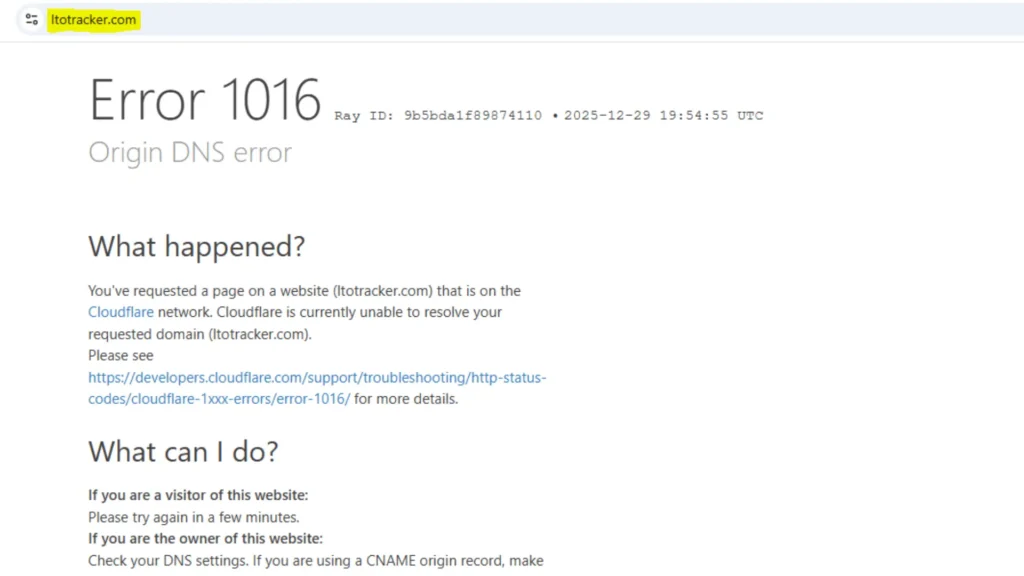
Common LTO Tracker Problems Users Experience
Users often encounter the following issues:
These issues are usually related to processing delays rather than missing plate records.
What You Can Do If the Tracker Is Not Working
If the tracker is unavailable, you can still check your plate or license status through other methods:
SMS Plate Status Check
Visit the LTO District Office
Use the eGovPH App
Tips to avoid LTO tracker errors — correct plate format and checking times
Frequently Asked Questions
Why does the LTO tracker say “Service Unavailable”?
The LTO’s online systems periodically go down for maintenance or buckle under heavy traffic — this is the most common cause. Try again during off-peak hours (early morning), use a different browser, or clear your browser cache. If the outage lasts more than a day, check the LTO’s official Facebook page for maintenance advisories.
Is there an official LTO plate-tracking website?
There is no single public LTO website where you can type in a plate number and see its live production status. Be skeptical of any private site claiming “real-time LTO database access” — no private website has that access. For your actual plate status, check with your dealer, your nearest LTO branch, or your LTMS portal record.
How can I really check where my plate is?
The reliable channels are: (1) your car dealer or motorcycle dealer, who receives plates in batches; (2) the LTO branch or district office where the vehicle was registered; (3) your LTMS portal account (portal.lto.gov.ph), which reflects your official records. For a quick unofficial read, try our plate status estimator.
Riding a motorcycle? See our motorcycle plate backlog update for the latest on delayed MC plates.
The LTMS portal itself won’t load. What now?
LTMS portal is known for slowdowns during enrollment and renewal peaks. Wait 15–30 minutes and try again, preferably outside 9 AM–4 PM on weekdays. The LTO usually posts outage notices on its official Facebook page.
Are “LTO tracker” sites that ask for payment legitimate?
No. The LTO does not charge for plate-status inquiries, and no private tracker site can pull your official record. Sites asking for payment or “processing fees” to “track your plate” are scams.
Can I check my plate status on my phone?
Yes — the eGovPH app includes LTO-related services, and the LTMS portal (portal.lto.gov.ph) works in mobile browsers. For traffic-violation checks, check your violations on the MMDA’s MayHuliKa portal (mayhulika.mmda.gov.ph) or the eGovPH app — both work on phones.
Conclusion
If the LTO Tracker is not working, it does not necessarily mean there is an issue with your plate or license. Most problems are caused by system maintenance, updates, or processing delays. While waiting for the tracker to be restored, using SMS verification, the eGovPH app, or visiting your local LTO office are reliable alternatives. Staying patient and checking periodically will help ensure you receive accurate updates once the system is fully operational.
Check If the LTO Systems Are Down Right Now
One click tests whether the LTO’s official websites respond from your connection. If they load here but not for you in another tab, the problem is likely your browser or network — not the LTO.
If everything shows reachable but you still can’t get through:
- Try again during off-peak hours (early morning) — the LTMS portal slows down on weekday mornings.
- Use a different browser, or clear your cache and cookies.
- Don’t hammer refresh — rapid retries can create duplicate sessions that lock you out.
- Check the LTO’s official Facebook page for maintenance advisories.
- For license and registration transactions, try the eGovPH app as an alternative.
How this works: this tool pings the LTO’s public websites from your own browser and reports whether they answer. It does not have access to LTO’s internal systems — no private website does. A “reachable” result means the site is up for you; a “no response” result could mean an LTO outage or a problem with your own connection.
This limitation is exactly why no private tracker can be real — here’s the full explanation.
Written by Joseph
Joseph covers LTO guides and helps Filipino motorists navigate LTMS online services — from portal registration and plate tracking to renewals and violations. Every guide is researched against official LTO and MMDA sources and updated regularly.

3 Comments