The LTO Portal, officially called the Land Transportation Management System (LTMS), allows drivers and vehicle owners in the Philippines to manage licenses, registrations, payments, and violations online. If you’re trying to log in, register, or fix login problems, this guide explains everything clearly in one place about LTO portal Login. portal.lto.gov.ph login.
Skip the guide — go straight to the source:
Go to the Official LTO Portalltostatus.com is an independent guide and is not affiliated with the LTO.
What Is the LTO Portal (LTMS)?
The LTO Portal or LTMS is an official online platform developed by the Land Transportation Office (LTO) to digitize driving and vehicle-related transactions. It serves as a centralized account where users can access their driver’s license records, vehicle details, payments, and learning certificates.
Instead of visiting LTO offices repeatedly, most services can now be started or managed online through this portal.
To access your account, you must use the official LTO LTMS website. Always make sure you are on the government-operated platform before entering your email or password.
Avoid clicking login links from social media ads, messages, or unofficial websites. Fake portals are commonly used for scams and data theft.
How to Log In to LTO Portal (Step-by-Step)
Logging in to the LTO Portal is straight forward if you already have an account.
Existing LTMS Account Login
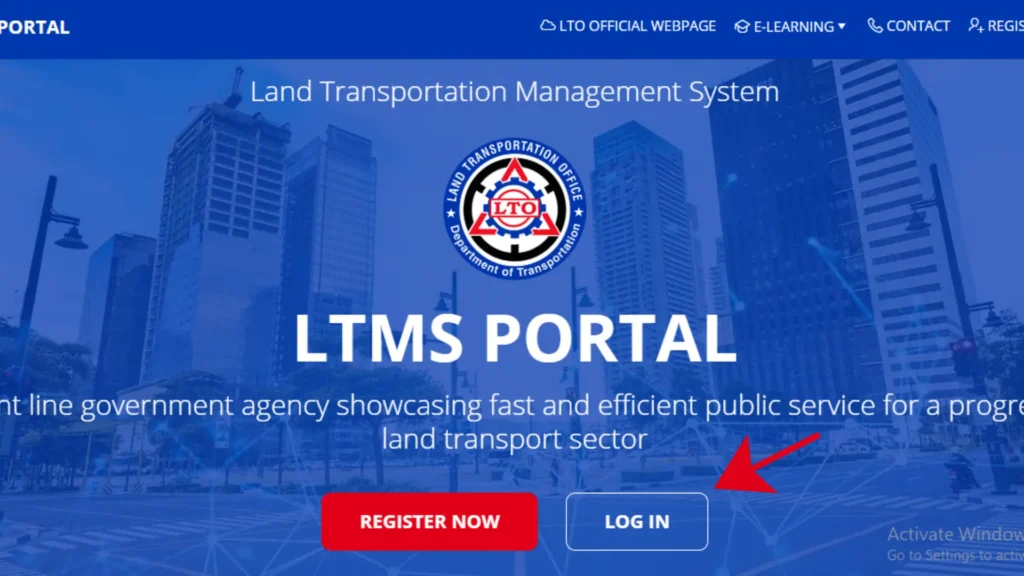
Once logged in, you can view your personal records, transactions, and available services.
Registering a New LTMS Account
If you don’t have an account yet, start by registering for an LTMS account.
During registration, you will be asked for:
After email verification, your LTMS account becomes active and can be used anytime.
Can You Use LTO Portal Without Logging In?
Some users assume all LTO services require login, but that’s not entirely true.
You may access limited public information without logging in, such as:
However, most transactions require an LTMS account, including:
To avoid confusion and delays, creating an account is strongly recommended.
Services Available Inside LTO Portal
Once logged in, the LTMS portal gives access to multiple LTO services.
Driver’s License Services
Planning to renew your license? Note that taking the CDE exam is a required step before renewal.
Vehicle Registration Services
Payments and Traffic Violations
Appointments and Certificates
These services significantly reduce waiting time at LTO offices.
For step-by-step help with booking an appointment at your preferred LTO branch, see our scheduling guide.
Is the LTO Portal Working Today?
At times, users may experience issues accessing the LTO Portal. This can happen due to:
When the portal is slow or unavailable, it is best to:
Most system interruptions are temporary and get resolved automatically.
Common LTO Portal Login Problems & Fixes
Forgot Password
Use the “Forgot Password” option on the login page and follow the email instructions to reset your credentials.
Verification Email Not Received
Check your spam or promotions folder. If not found, wait a few minutes before requesting another verification email.
Account Locked or Login Failed
Multiple incorrect login attempts may temporarily lock your account. Waiting a few hours usually resolves this issue.
Website Loading Error or Slow Access
This often happens during peak hours. Try using a stable internet connection and revisit the portal later.
Is the LTO Portal Safe to Use?
Yes. The LTO Portal is a legitimate government platform operated by the Land Transportation Office.
To stay safe:
Official LTO services do not ask for passwords outside the portal, only go for LTO portal sign in.
You can now check Coding Hours in different Cities, with the help of our Coding Hours Status Checker.
Frequently Asked Questions
What is the official LTO portal website?
The official Land Transportation Management System (LTMS) portal is portal.lto.gov.ph. Always check that the address in your browser matches exactly before entering personal details — fake sites imitating the LTO portal are common, and the LTO never asks for payment just to create an account.
Is LTMS registration free?
Yes. Creating an LTMS portal account is free. Anyone asking you for a fee to ‘create an account’ for you is a fixer — report them and register yourself at portal.lto.gov.ph instead.
I didn’t receive the LTMS verification email. What should I do?
First check your spam or junk folder, then wait a few minutes — LTO’s emails can be delayed during peak hours. Make sure you typed your email address correctly during registration. The verification link is time-limited (usually around 24 hours), so if it expired, register again with a working email address.
How do I reset a forgotten LTMS password?
On the portal login page, click ‘Forgot Password,’ then enter your registered email address or 15-digit LTO Client Number. LTO will send a reset link to your email — check your spam folder if it doesn’t arrive within a few minutes.
I get a ‘license already registered’ error. What does that mean?
This usually means the personal details you entered don’t exactly match what’s already in LTO’s records — for example, a name spelled differently from your official documents. Re-enter your details exactly as they appear on your license or OR/CR. If it still fails, visit an LTO branch with a valid ID.
Can I log in with my LTO Client Number instead of my email?
Yes. The LTMS portal accepts either your registered email address or your 15-digit LTO Client Number as the username, plus your password.
Is an LTMS account required for license renewal?
Yes, an account is required to process renewals online. Many portal logins are for renewing your driver’s license.
Can I pay traffic violations using the LTO Portal?
Yes, traffic fines and penalties can be paid through the portal.
Is registration on LTMS free?
Yes, creating an LTMS account is completely free.
Can I access my records anytime?
Yes, your driving and vehicle records remain accessible 24/7 when logged in.
Conclusion
The LTO Portal (LTMS) is an essential tool for Filipino drivers and vehicle owners, offering faster and more transparent access to LTO services. While login issues or temporary downtime may occur, most problems are easy to fix. By using the official portal and understanding how the system works, you can manage licenses, registrations, and payments more efficiently without unnecessary office visits.
Prefer to transact in person? You can find an LTO office near you.